Disk quota, df and stat weird behaviour
The aim of this article is to understand where the numbers that are shown by stat/df utils in container come from.
Contents
Conventions and notationsEdit
Consider typical OpenVZ setup, where ext2 separate file system is mounted on /vz. ext2 is called underlying file system in such situation.
Linux VFS design allows every file system to export to user space the following information concerning disk space (here and further is used to specify particular file system type):

- - total amount of disk space that potentially can be acquired (e.g. HDD capacity)
- - amount of disk space that is still free
- - amount of disk space that is still available for non-root users


Note that not all free blocks can be used by non-root users: some amount of disk space is reserved for root. For example on ext2 file system only root can use last free 5 percent (by default) of disk space. This is the difference between and . Also note, that the following inequality is always true:
- (1)

Inside a container, a special file system type is used, called simfs. This file system allows to isolate a particular CT from other CTs. Hence, when df or stat utilities are invoked, they get information from simfs, which exports the following values (by analogy with ext2):


This article is in fact devoted to how simfs file system calculates the values above.
To produce any calculations, input data are required. What are input data for simfs? Aside from already mentioned information from underlying file system ( , , ), one more element comes into force in OpenVZ environment. It is OpenVZ per-container disk quotas. The values that provide this element are:
- - the number of blocks currently used by a CT
- - the number of blocks this CT can potentially obtain


OpenVZ disk quota counts the number of blocks currently used by a CT and prevents this number to be greater than the limit/barrier set.
CasesEdit
Consider three basic possible scenarios.
Quota is off for CTEdit
- If quota is off for a CT (
DISK_QUOTA=no), the total amount of space that this CT potentially can acquire equals the amount of total space on a partition. Certainly some space can be used by other CTs, but potentially a CT can have all the space on device. So, the number of free blocks for the CT equals the number of free blocks on partition. Note it implies that a CT root user can fill in all the space, including the space reserved for root user of the host system. This is why one should not reside CTs private areas on root file system of your host system. The amount of available disk space for CT equals the number of available blocks for the underlying file system. Thus, we have the following relationships:
- =
- =

- Rather valuable disadvantage of switching off OpenVZ quota (besides having unlimited CTs) is that you will not be able to get information about how much disk space is used by a CT (without doing possibly long term
ducommand) usingdf/stat. I mean, that - thus in the CT you obtain information about disk usage of partition, but not disk usage of the CT.

Quota is on for CT, and there is enough space on partitionEdit
- If disk quota is on, the amount of disk space that a CT can potentially acquire should be equal to the quota barrier:
- The amount of free space in this case should logically be:
- However here is a pitfall. Suppose that the amount of free disk space on the underlying filesystem is less than it is estimated from quota using the formula above, i.e.:
- Then, definitely, the amount of free disk space reported by
simfsshould be different. This situation will be examined later; here we assume that there is enough space on partition, i.e- (2)
- As for amount of disk space available for non-root users, if there is enough disk space:
- then amount of disk space available for non-root users in a CT equals the free space estimated from quota:






Quota is on for CT and there is NOT enough space on partitionEdit


|
This is the most interesting and difficult to explain case. Nevertheless I tried to do it. So, our assumption is that: What should be reported as free space in such case? Of course, ! This is the actual amount of space that can be used by a CT. Hence: Now consider the following situation. There are two containers. First CT writes nothing to disk. Second CT writes something to the disk. An administrator of CT #1 looks at
decreases because CT #2 writes to disk, consequently increases! “What the hell is going on?!”, — thinks the administrator: “Nobody writes to the disk [in my container], but the usage increases”! To avoid such a situation, the following approach is used in OpenVZ: decrease , so that remains the same, i.e.:
By substituting (4) to (3), we get: In this case, administrator of CT #1 sees that total amount of space decreases, but usage however is constant. The same reason as with fits for calculating . Two cases are possible. If then and if then The table below summarizes all possible cases. |










Cases ConclusionEdit
So there are three basic variants. Variant number one is not good, because a container's administrator can not get information about CT disk usage and the host system administrator can't limit CT disk usage. Variant three is not good because we have some weird (but logical) values in df/stat output in CT, e.g. total disk space can decrease. Variant two is perfect. How can we make sure that this variant always take place? Here is the simple rule:

|
Warning: Do not set random disk quota barrier/limit! |
Even if you want a container to be unlimited, consider reasonable values. Use the following formula:
- (5)
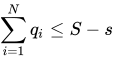
Here is quota barrier for CT ,
— total amount of space on underlying file system
— amount of space used by everything else than CT private area: templates, locks, etc.


Note that if you install a template, you decrease . This is bad because, ideally, after each template
installation you have to check inequality (5). To avoid this I suggest to mount separate partition on /vz/private, rather than on /vz. In such case always equals .

Cases Summarizing TableEdit
| Quota off |
| |
| Quota on |
|
|
|
|
| |
|
|
| |







Other reasons of strange numbersEdit
At the moment I see only two more reasons why numbers in df/stat output can confuse you.
- The quota is inconsistent. This can happen if you turned quota off for some time, if you wrote directly to private area (
/vz/private), but not throughsimfs, etc. When you have doubts whether your quota is consistent or not, just drop quota (vzquota drop <ctid>, where<ctid>is the id of a stopped CT). While starting CT,vzctlwill automatically initialize quota. - Unsupported underlying filesystem. Currently OpenVZ quota only supports
ext2,ext3andext4. With other file system types you can have unpredictable results. Praemonitus praemunitus!
TODOEdit
TODO: Add examples with stat/df